Cards
The cards read sensor.schoolday_board and the per-member sensors, so no card has to be told who your family is. Adding a card with no options at all is the normal case.
Every card takes board_entity as an escape hatch for a renamed board sensor. It is deliberately absent from every visual editor: only one board can exist, and an entity picker that is meant to stay empty is a question nobody should be asked.
Timetable card
type: custom:schoolday-timetable-card
The card finds the household’s lesson grid, offers the members who have a timetable, shows the first five days of the week (Monday to Friday, or Sunday to Thursday if the household’s week begins on Sunday), adds other days only when somebody has lessons on them, hides periods nobody has, marks today and the lesson running right now, and falls back to a single day when it is too narrow for a week.
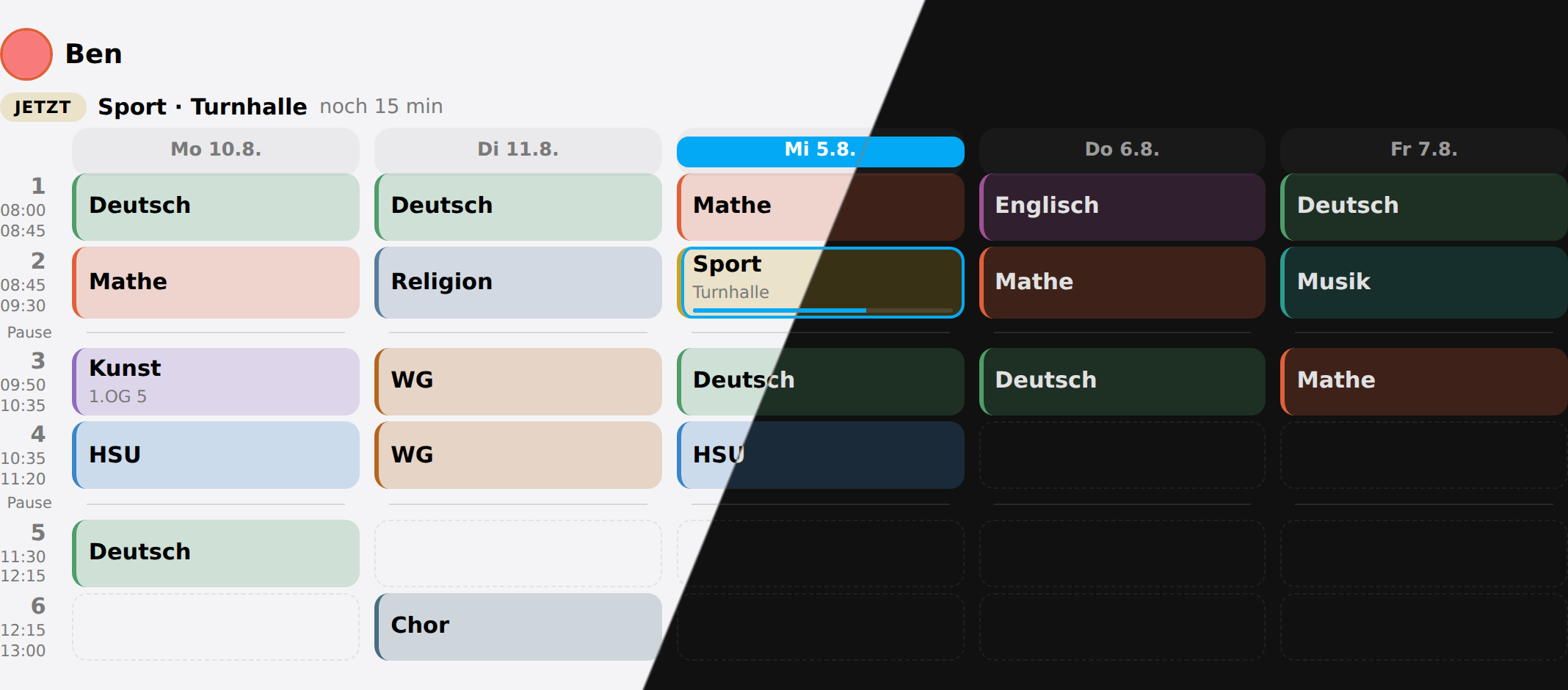 One child’s week. Today is the highlighted column, the running lesson is outlined, and the times and breaks come from that child’s own school.
| Option | Default | What it does |
|---|---|---|
member | all | One child only, by name or id. Otherwise the card offers a switcher. |
layout | auto | auto shows the week and drops to one day when narrow; week; day. |
week_days | auto | auto follows the timetable; school is always the first five days of the household’s week (Mon–Fri, or Sun–Thu where it begins on Sunday), so use auto for a six-day school week; week is all seven. |
show_rooms | true | The room under the subject. |
show_times | true | The times next to the period number. |
show_breaks | true | The break rows between the periods. |
hide_empty_periods | true | Leave out periods that are free on every day shown. |
highlight | true | Today, the running lesson and the “now / next” line. |
roll_days | true | Point a weekday that has been at next week’s. Off shows the week as it stands. |
Children at two schools that ring differently each get their own rows: the card draws the grid of whichever child is on screen.
A cancelled lesson is gone from its day and a covered one is marked, whether it was typed in or read from the school’s system. An exam gets a label on the lesson it falls in, with the school’s own title in the tooltip.
Routines card
type: custom:schoolday-routines-card
What has to happen before the door in the morning and before bed in the evening, ticked off by the children themselves. With no member set it shows the whole family side by side, which is what a wall panel is for.
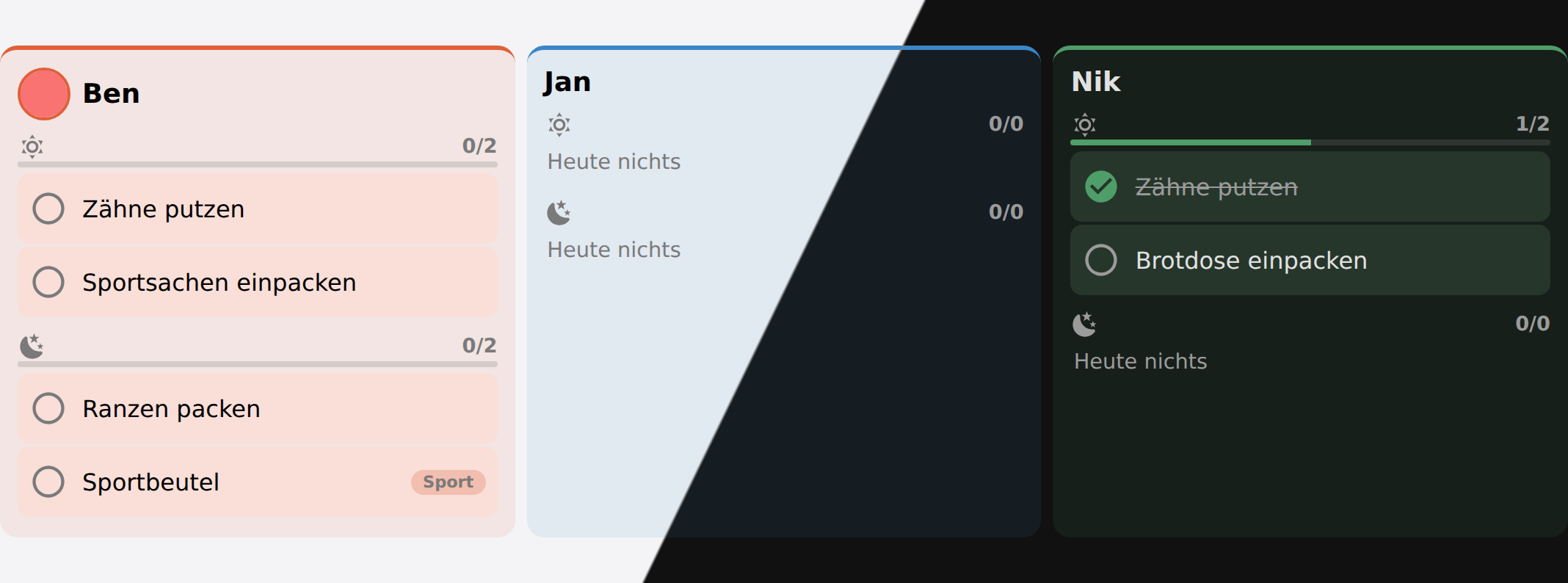 The whole family at once. “Sportbeutel” carries the subject that put it on the list — the timetable generated that step rather than anybody typing it.
| Option | Default | What it does |
|---|---|---|
member | all | One child only. Unset shows the whole family side by side. |
block | auto | auto switches by time of day; morning; evening; both. |
evening_from | 14 | The hour at which auto flips to the evening list. |
show_empty | false | Keep children who have nothing on today. |
A child at home ill stays on the board either way, with the reason instead of a list: dropping them would answer the wrong question.
The evening before an exam shows it above the steps. It is not a step: learning for a test is not a box that is either ticked or not, so it adds nothing to the count and nothing to the record.
Routine record card
type: custom:schoolday-stats-card
How the routines are actually going, from the record the integration keeps. Not a card for the wall next to the routines — it is for whoever has to decide whether the evening routine is working, which is a different question and has never had an answer, because the ticks are wiped every midnight.
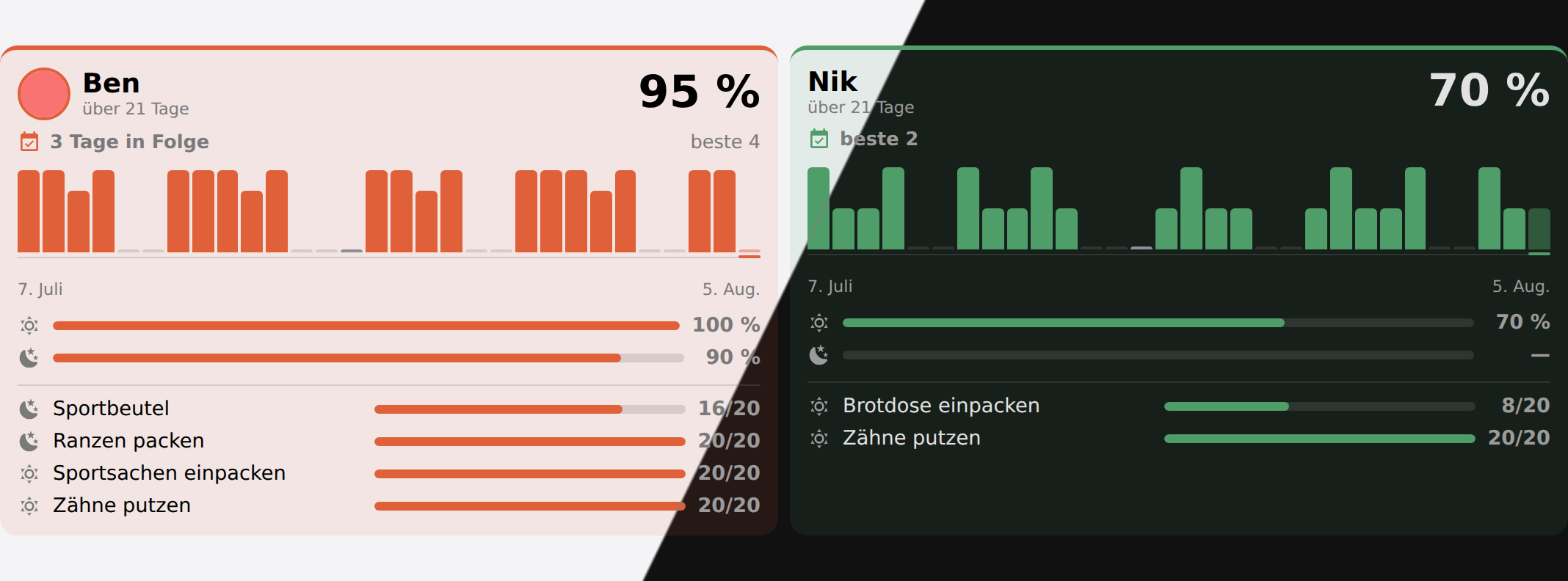 One column per child: the rate over the window, the run of complete days, one bar per day, morning against evening, and the steps that keep being skipped
Each bar is a day, as tall as the share of that day that got done. A day that asked for nothing — a weekend, a holiday with no list, a day at home ill — is a baseline tick rather than a short bar: it is not a day anybody failed, and it must not read as one. Today’s bar is drawn faded, because today is not over.
The list underneath is the interesting one. A routine that fails is rarely failing everywhere at once; it is the same two steps, and they are usually the ones that belong somewhere else in the day. Worst first, so that step is at the top rather than the bottom.
| Option | Default | What it does |
|---|---|---|
member | all | One child only. Unset shows everyone who has a routine. |
days | 30 | How far the strip reaches back. Thirty is everything the integration keeps. |
show_steps | true | The tally per step under the bars. |
sort | board | board keeps the family’s usual order; rate puts the best record first. |
Ranking is deliberately opt-in. A wall panel whose columns move about from one day to the next is harder to read than one that does not, and the percentages compare perfectly well standing still.
A child with no routine at all is left off the card rather than reported as 0 %: they were never asked for anything, and failing to do nothing is not a thing that happened.
Homework card
type: custom:schoolday-homework-card
Each child’s homework grouped by when it is due, soonest group first, ticked off on the card. It draws a Home Assistant todo list, so the same items are reachable by voice and from the todo panel.
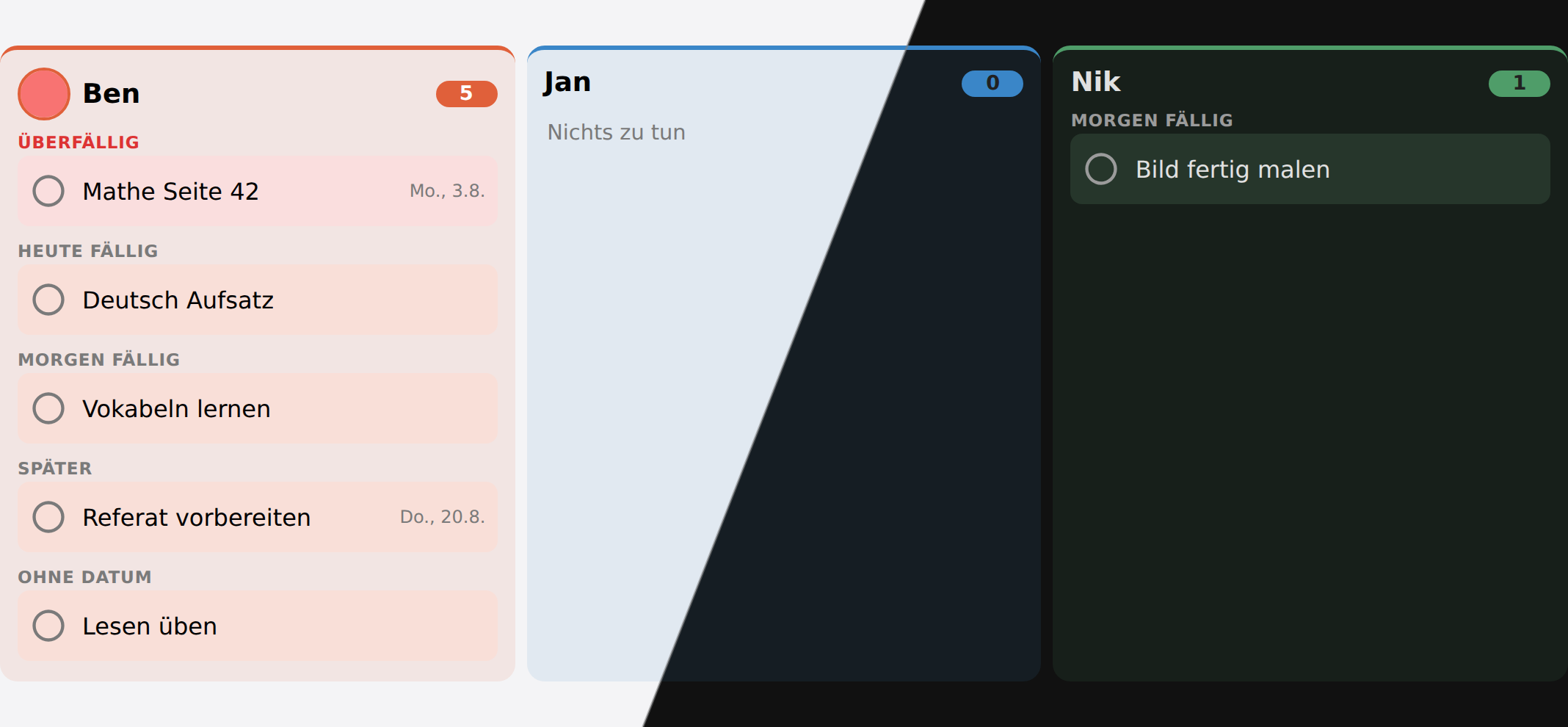 Grouped by when it is due. The number beside each name is what is still open.
| Option | Default | What it does |
|---|---|---|
member | all | One child only. |
show_done | false | Show what is already finished. |
show_empty | false | Keep children with nothing to do. |
Header card
type: custom:schoolday-header-card
weather_entity: weather.home
Clock, date and weather — the strip along the top of a wall panel. On a school morning it also says when each child has to leave, for every child with a way to school or a time to leave: the time, an hour before that a countdown, amber for the last ten minutes, then “jetzt los!” in red until their first lesson begins — or for ten minutes, after a bus time or on a day in holiday care. It reads the leaving time off the child’s sensor, so a cancelled first period moves it here too. From the evening on the sensor points at tomorrow, and the strip stays quiet until tomorrow comes.
 Clock, date and weather along the top of a wall panel
| Option | Default | What it does |
|---|---|---|
weather_entity | — | Which weather to show. Omit for no weather. |
greeting | — | A word after the greeting, usually the household’s name. |
show_seconds | false | Seconds on the clock. |
show_leave | true | When each child has to leave, on a school morning. |
 07:25 on a school morning: Ben leaves in five minutes, Jan should be on his way, Nik has twenty-five minutes.
Admin card
type: custom:schoolday-admin-card
Everything the options dialog can change, on the dashboard: the timetable, routines, the family, subject colours, materials, exceptions and days off. Finding the integration page to move one lesson is more ceremony than the job deserves.
The card never writes the configuration itself. It calls a service, and the service decides whether the value is allowed — so there is one set of rules and not two, and a refused value comes back as a readable reason.
Those services are admin only, so the card is for an administrator’s dashboard. Signed in as anybody else — a child’s account on the wall tablet, say — it still shows everything, but every change is refused.
| Option | Default | What it does |
|---|---|---|
section | timetable | Which section to open on. |
Timetable
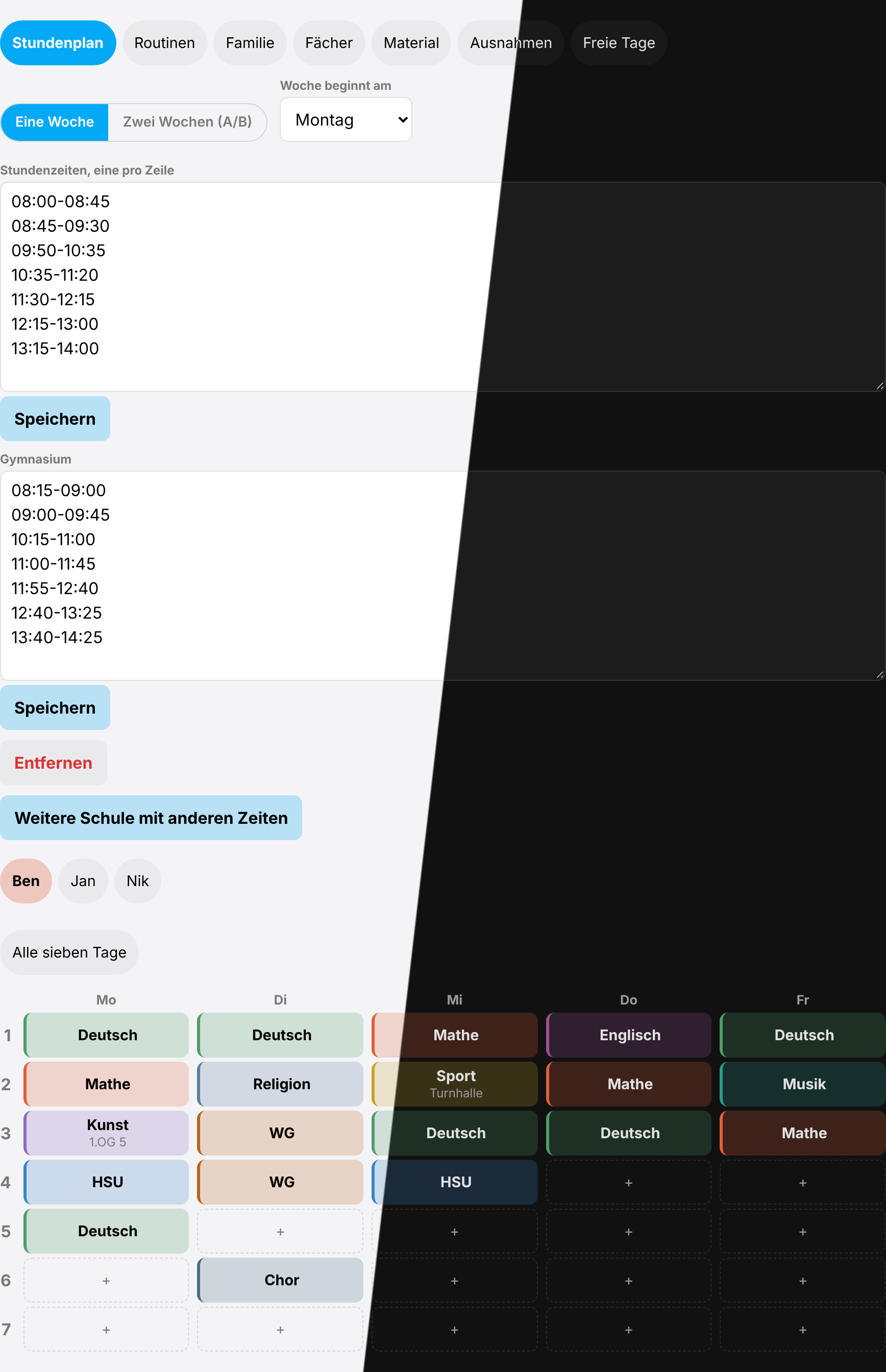 The cycle and the first day of the week at the top, then the household’s lesson times, another school’s under them, and the week below. Tap a cell to set a lesson. All seven days shows the days that have no lessons yet.
The lesson times live at the top of this section, and under them any other school’s — for a household whose children are at two that do not ring at the same minute. A child is put on one in the Family section.
Routines
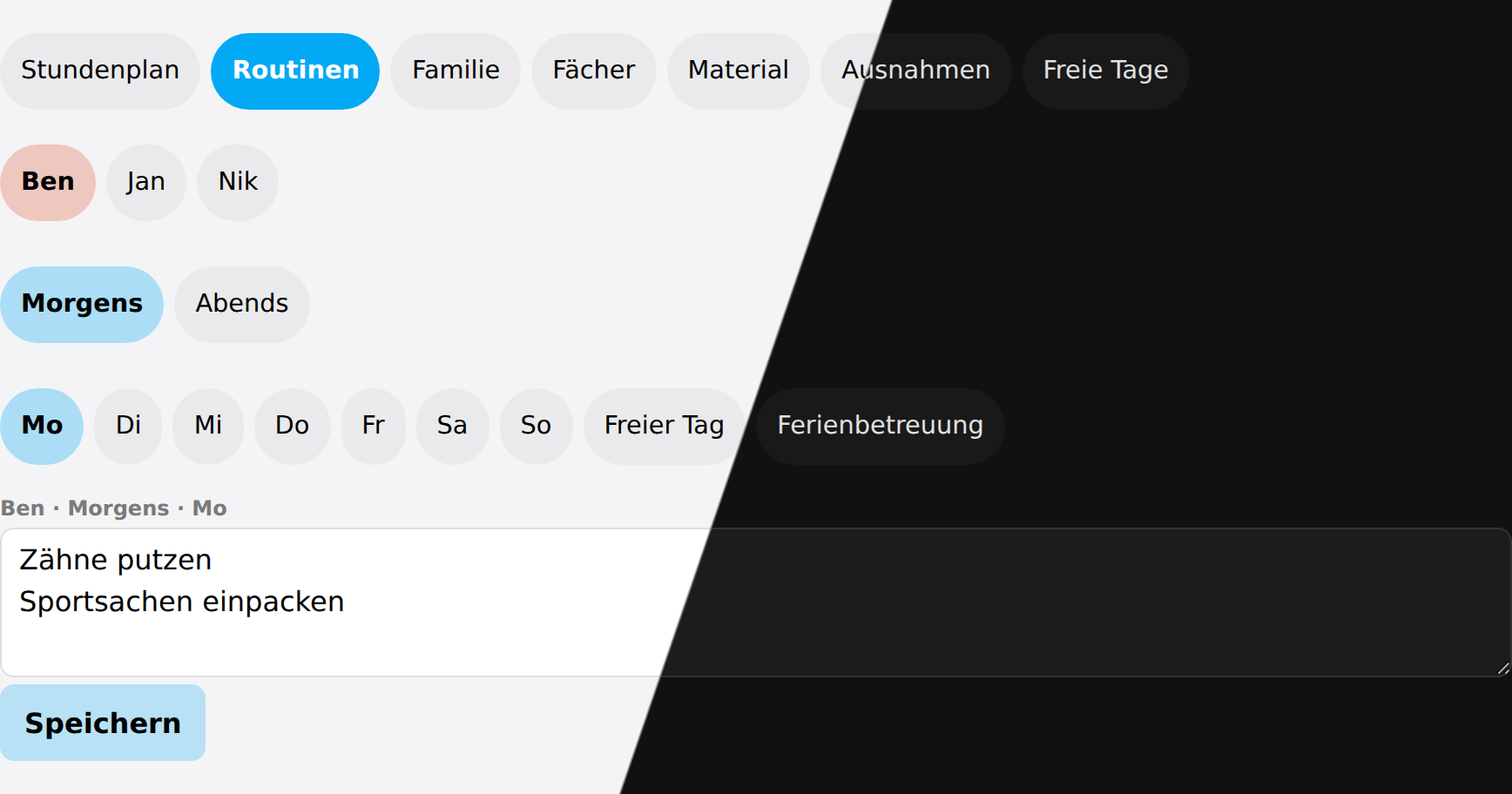 One block, one day at a time — including the two kinds of day off
Family
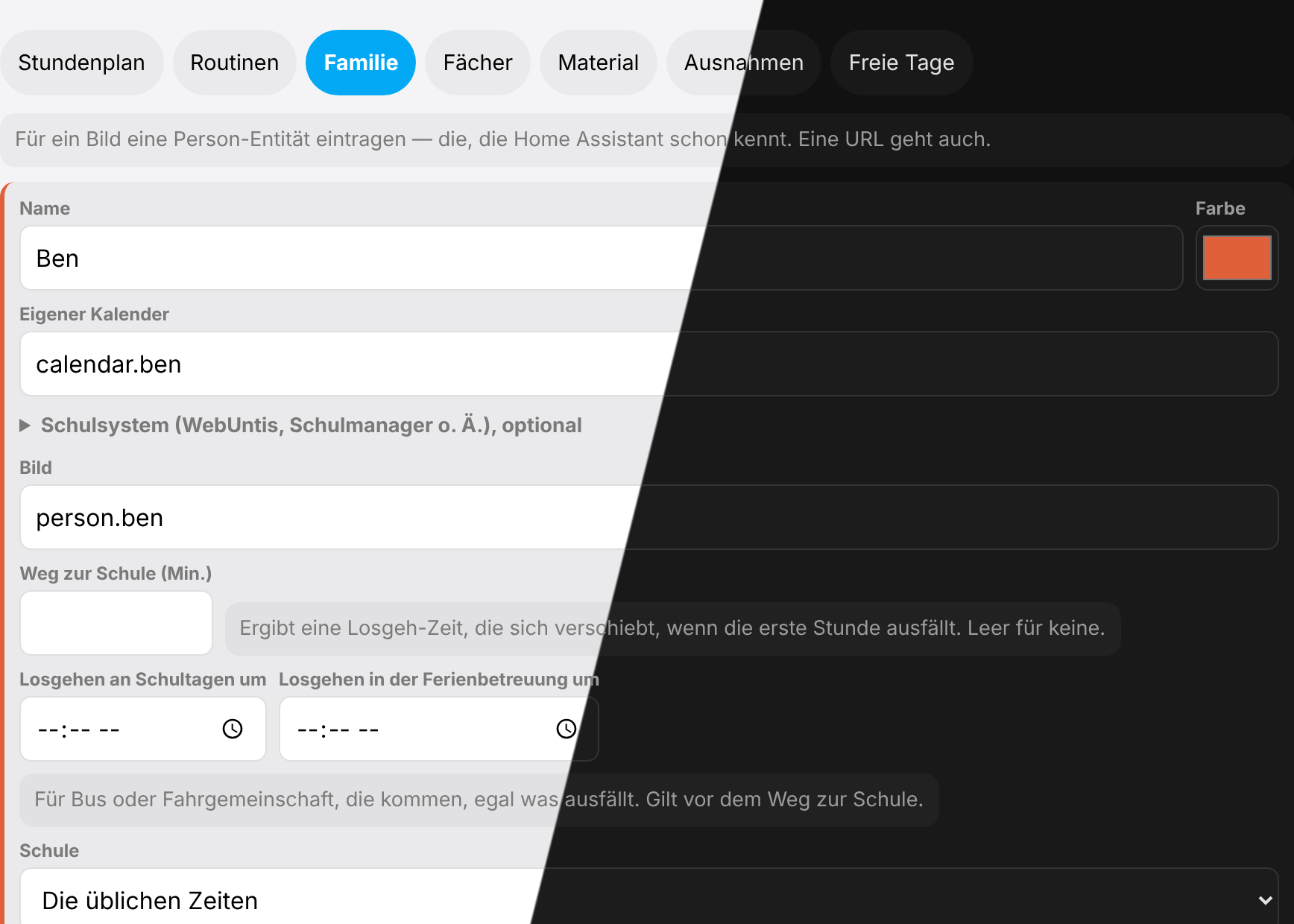 Name, colour, the calendar searched for the holiday-care keyword, the school system’s lessons and exams calendars and homework list — folded away until a child has one — a picture taken from a person entity, the way to school in minutes, the times to leave for a bus and for holiday care, and which school’s lesson times they ring to. The last of those only appears once there is more than one school to choose between. An empty way to school means no leaving time; 0 is one.
Material
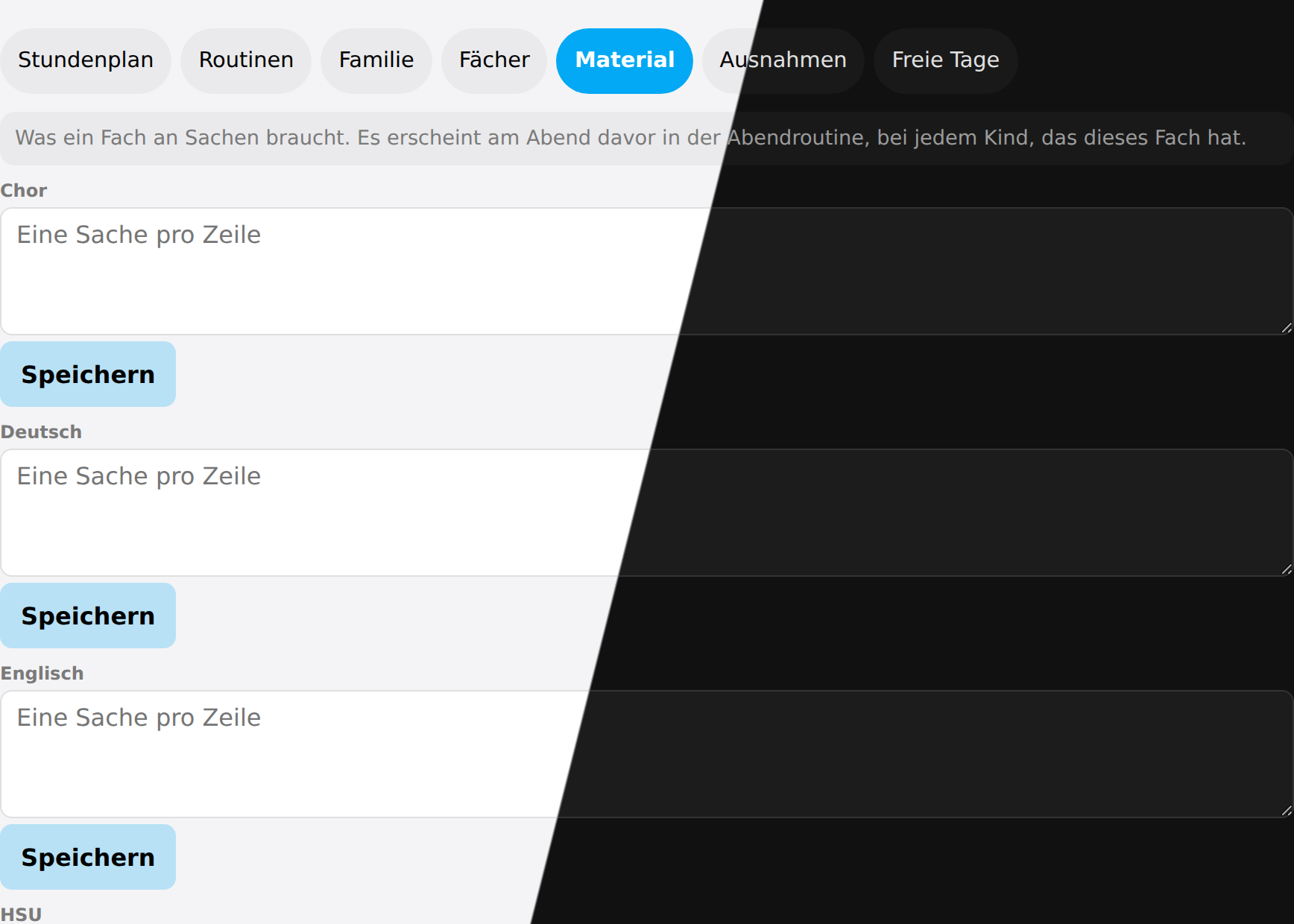 One box per subject. These become the evening packing list on the day before.
Exceptions
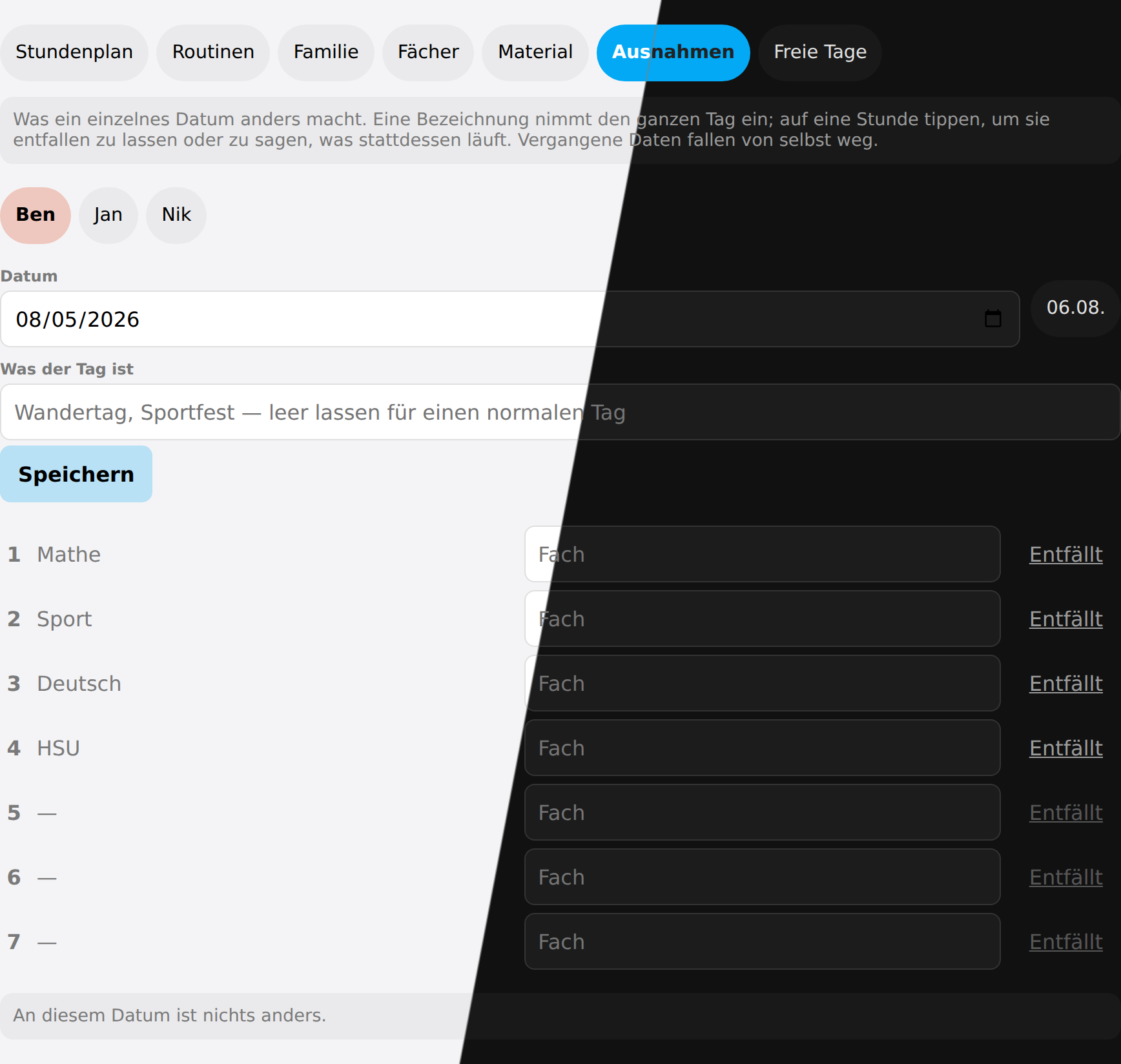 One date at a time: a name takes the whole day, or a single period is cancelled or covered
Days off
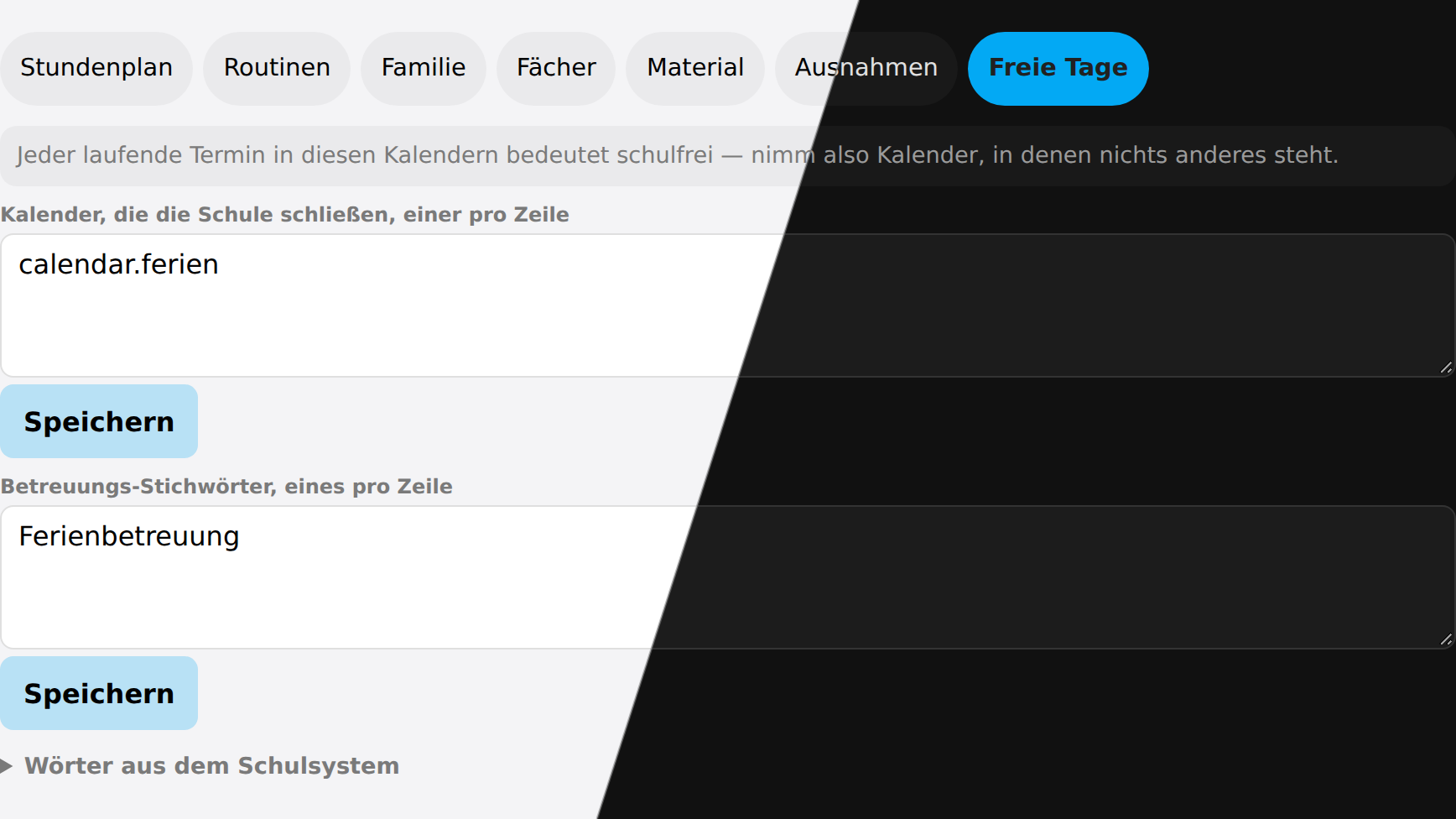 Holiday calendars are picked as entities; the care keywords stay the household’s own words. The words from the school system are folded away, and only there at all once a child has a lessons calendar.
Restyling with card-mod
Every card is a Lit element with one shadow root, and nothing inside it is a nested custom element of Schoolday’s own. That is what makes card-mod work here: the <style> it appends lands in the same shadow root everything is drawn in, so a selector reaches its target without any $ piercing.
type: custom:schoolday-routines-card
card_mod:
  style: |
    ha-card {
      --schoolday-radius: 4px;
      --schoolday-muted: #888;
    }
The variables
They are declared once, in src/lib/styles.ts, and every card reads the same ones. Each of the four that borrow from Home Assistant follows your theme unless you say otherwise — setting one here overrides it for Schoolday alone.
| Variable | Default | What it colours or sizes |
|---|---|---|
--schoolday-gap | 8px | The space between children on the family cards |
--schoolday-radius | 12px | The corner of every panel inside a card |
--schoolday-touch | 44px | The smallest a tappable thing is allowed to get. Lower it and a wall tablet gets harder to hit |
--schoolday-muted | --secondary-text-color | Secondary text: counters, captions, the “nothing today” line |
--schoolday-line | --divider-color | Rules, bar tracks, empty meters |
--schoolday-surface | --card-background-color | What a tinted panel is tinted against |
--schoolday-surface-alt | rgba(127,127,127,.08) | The quieter panel: an ill child’s block, a pressed button |
--schoolday-today | --primary-color | Today’s column, the running lesson, the pressed segment |
--schoolday-holiday | #b08d57 | A day off |
--schoolday-care | #2f7f8f | A day in holiday care |
--schoolday-sick | #8a8f98 | A child at home ill |
--schoolday-event | #7a5ea8 | A day the school took over — a trip, a sports day |
The last four are deliberately not from the subject palette: a day off is not a subject, and nobody should have to wonder whether the sand-coloured block is a holiday or somebody’s Art lesson.
Two colours that are data, not styling
--member-color and --subject are set inline, per element, from what the integration holds — a child’s colour and a subject’s colour. Change those in Schoolday itself (Family and Subjects in the admin card) and every card follows at once, which is the point of them living there.
A card-mod rule can still override them, but it needs !important, like any rule against an inline style.
Rules on classes need !important
Not a matter of specificity — of cascade order. Lit adopts its styles as constructable stylesheets, and those come after a <style> element in the same shadow root, so at equal specificity the card wins:
card_mod:
  style: |
    .step { background: rgb(0, 128, 0) !important; }
The smoke suite checks both halves of this — that the variables can be overridden and that a class rule needs the !important — so neither can quietly stop being true.
The classes worth targeting
Stable enough to write a rule against; the ones not listed are layout scaffolding that may move.
| Card | Classes |
|---|---|
| Timetable | .title .chips .chip .grid .col-day .col-date .cell .subject .room .exam-tag .time .t-break .status .closure |
| Routines | .person .person-name .avatar .block .block-head .progress .bar .bar-fill .step .label .from .exam-note .sick-note |
| Routine record | .person .person-head .name .rate .window .streak .strip .day .axis .row .meter .meter-fill .value |
| Homework | .person .bucket .bucket-head .item .label .due .count |
| Header | .clock .date .greeting .weather .temperature .condition |
| Admin | .tabs .field .row .apply .danger .notice .error |
Language
The cards follow Home Assistant’s own language rather than a card option, so a German household gets a German wall panel without configuring anything. English is the fallback, key by key.
Shipped today: German, English and Hebrew. A fourth language needs four small additions, no new logic: a translation file under custom_components/schoolday/translations/, one block in src/lib/i18n.ts for the cards, one block in the sentences and weekday names in custom_components/schoolday/plan.py for the plan-change message, and the suggested holiday-care keywords in custom_components/schoolday/const.py.
Hebrew turns the cards right to left, and text the household typed keeps its own reading order in either direction.